WooCommerce PDF invoices, built with a configured workflow.
Design a PDF template, then configure a macro for a supported WooCommerce order status. The macro can generate a PDF and send a separate template email with the file attached. Test the workflow and your mail setup before relying on it.
Watch an invoice build itself.
A short walk-through of the drag-and-drop builder behind every invoice: design the PDF layout, drop in dynamic order tags, and preview. The same builder powers the automated flow below.
Recordings show the interface at the time of capture and can differ from the current build. Follow this page and the current command reference for supported behavior.
WooCommerce sends the email. Not the invoice.
A customer checks out. WooCommerce fires a plain confirmation email with no document attached. So you open the order, retype the details into a separate invoicing tool, export a PDF, and email it back by hand. Every order. Or you license yet another single-purpose plugin.
Build a WooCommerce PDF workflow. In one place.
Build a PDF from a saved template and use a configured macro to send it when a supported order status changes.
Branded PDF invoices
The generate PDF command creates a document from a saved template when you run it or when a configured macro runs.
Emailed to the customer
A configured macro can pass the PDF path to a separate template email. Delivery depends on your WordPress mail configuration.
Ready-made invoice template
Start from the built-in Invoice PDF template, then swap in your branding, fields, and wording.
Visual and code editor
Drag-and-drop blocks for speed, or drop into a raw HTML block for full design control.
Live order data
Dynamic tags pull the order number, billing address, totals, and tax straight into every invoice.
Document log
Every generated PDF is recorded with its file name, source template, status, and timestamp.
Design the invoice. Make it yours.
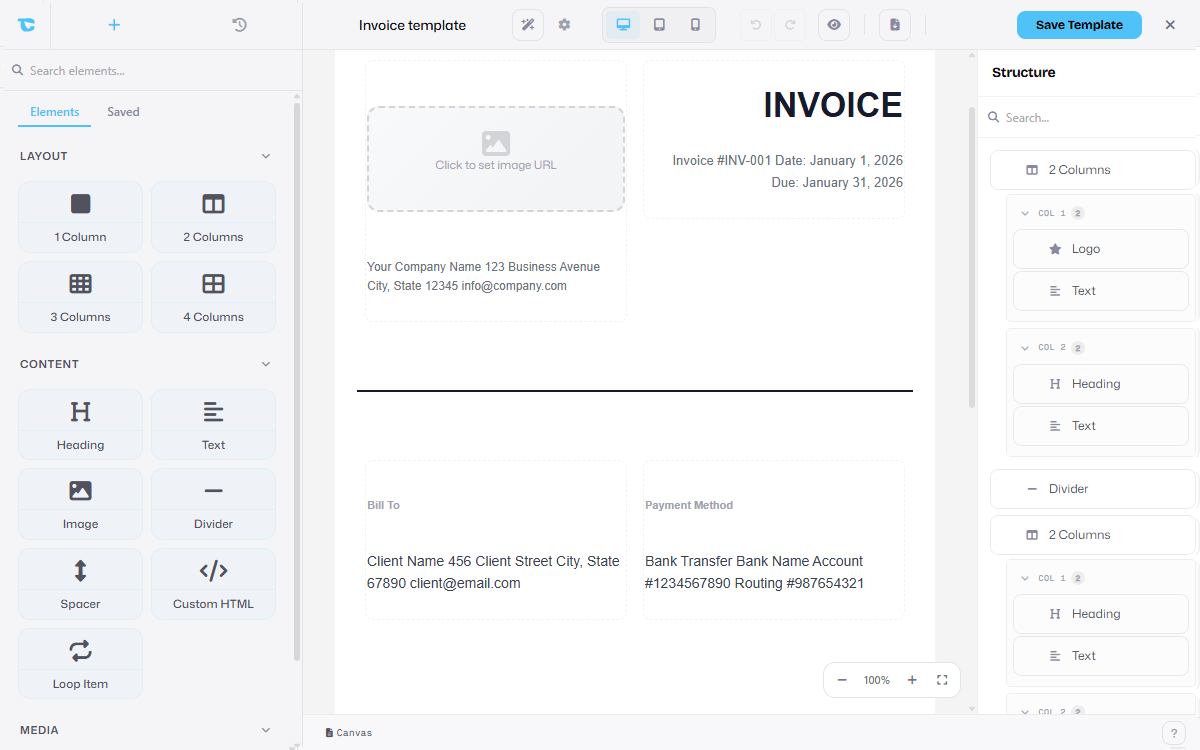
Open the Email Builder and lay out your invoice with drag-and-drop blocks: a logo, headings, a looped line-item table, totals, and payment terms. Style every block, then save it as a reusable template for your store.
- Drag blocks for logo, text, columns, dividers, buttons, and loops
- Style padding, borders, colors, and typography per block
- Save once and reuse the template for every WooCommerce order
- Export the same template as email-safe HTML or a print-ready PDF
- Password-protect sensitive invoice PDFs
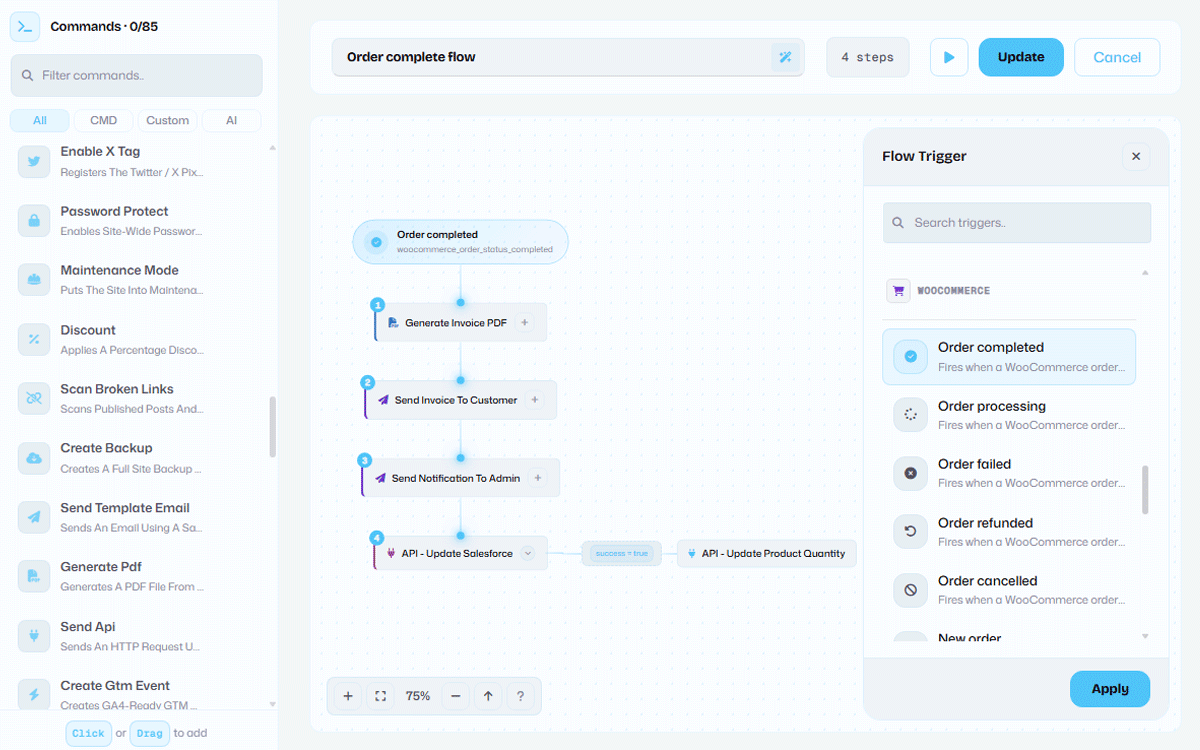
Order status changes. Configure PDF delivery.
Choose a supported WooCommerce order status trigger, then add generate PDF and send template email steps. Test the recipient, attachment and WordPress mail delivery before enabling the macro.
- Triggers for processing, completed, refunded, cancelled, and failed order statuses
- Generate PDF and send template email run as one macro
- Build a credit-note template and trigger it on the refund event
- Add a send API step to push the order to your CRM, accounting tool, or any webhook
- Runs unattended through the Macro Builder when a matching configured status event fires
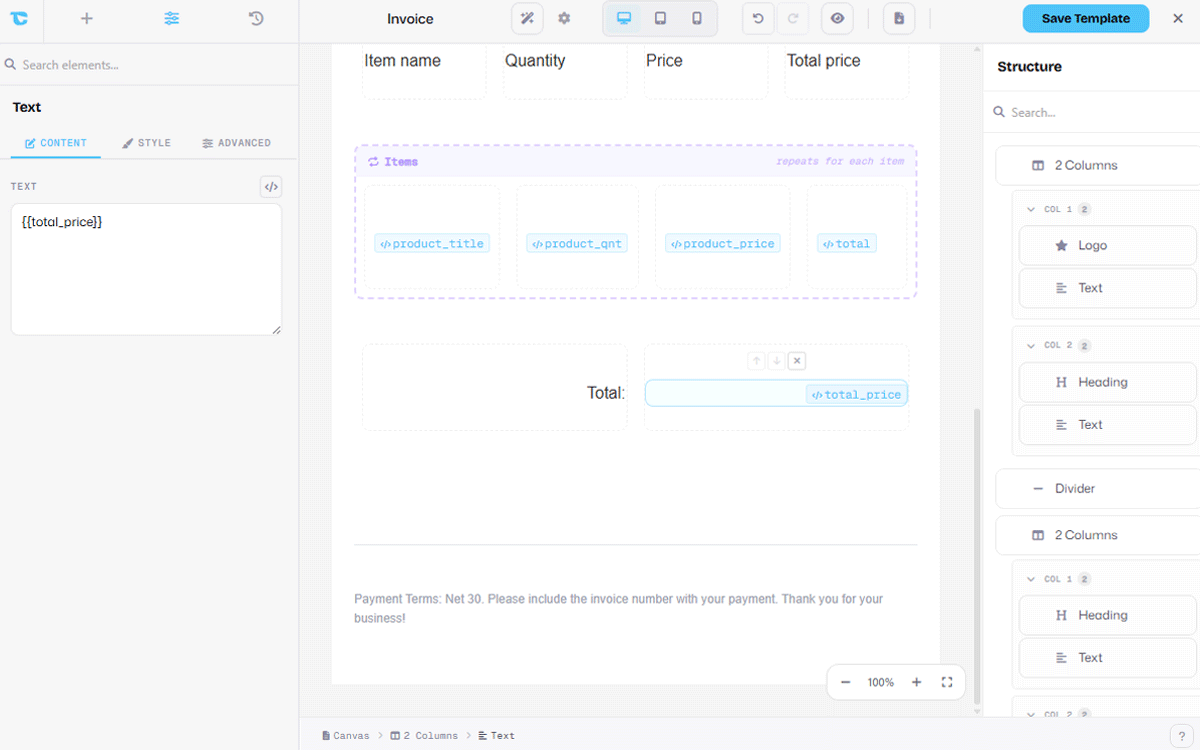
Real order data, filled in automatically.
Dynamic tags map straight to the WooCommerce order. Drop {{trigger.order_number}}, {{trigger.billing_full_name}}, or {{trigger.order_total_formatted}} into the template and they resolve at generation time. Loop blocks repeat a row for every product in the order.
- Order number, dates, billing and shipping addresses
- Subtotal, tax, shipping, discounts, and grand total
- Loop blocks render one table row per line item
- Site variables for reusable values like your company address
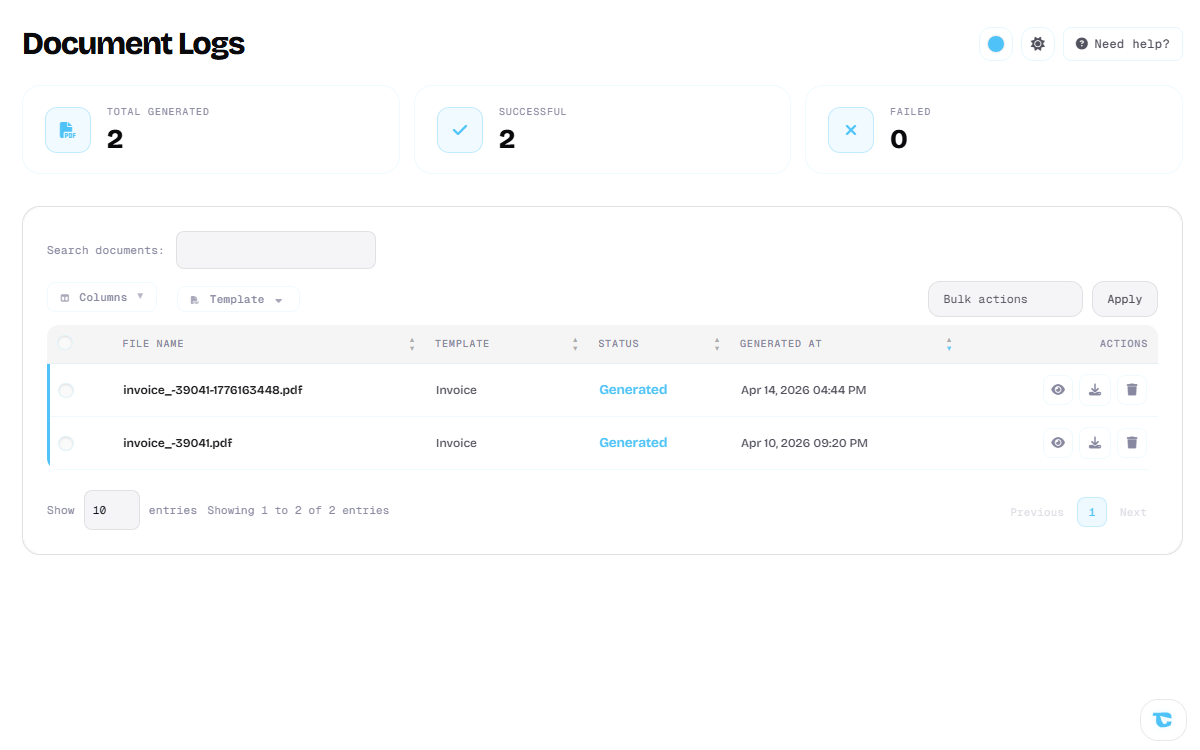
Download on demand. Tracked for good.
Preview and download a template PDF from the builder. Generated PDFs are recorded in the document log with their filename, source template, status and timestamp. Check the separate email log for delivery results.
- One-click download of a template PDF from the builder
- Generate PDFs for past orders when you supply the needed order data to a manual run
- Document log records every PDF with its status and timestamp
- Failed generations are logged with the error for a quick fix
The details real invoicing needs. Numbers, slips, and tax.
An invoice is more than a layout. Numbering, supporting documents, tax fields, and the tools you sync to are all part of the same builder and macro.
Sequential invoice numbers
An increasable variable can provide a number when its token is rendered. Configure the prefix and check numbering against your accounting requirements.
Packing slips and credit notes
The builder is general purpose. Drop the prices for a packing slip, or build a credit-note template and fire it on the refund trigger. Same blocks, same macro.
Tax, VAT, and GST
Dynamic tags pull subtotal, tax, and grand total from the order. Type your VAT or GST registration number into a text block and it prints on every invoice.
Sync to your CRM
Add a send API step to the macro and every invoiced order can post to your CRM, accounting app, or any webhook, so invoicing is one step in a bigger workflow.
Three steps. Then it runs itself.
Set it up once. From then on, every WooCommerce order produces its own PDF invoice.
Design your invoice
Lay out a custom WooCommerce invoice in the Email Builder, or start from the built-in Invoice PDF template.
Wire the macro
Add a generate PDF step and a send template email step under a WooCommerce order trigger in the Macro Builder.
Orders run themselves
For matching status changes, the configured macro can generate a PDF, pass it as an attachment to a template email, and record PDF and email results.
One plugin. Invoicing and nine more modules.
WooCommerce PDF invoices are not a separate purchase. They are one workflow inside TrueCommander.
Questions? Answered.
Build a WooCommerce PDF workflow.
Design a PDF template, configure a supported order status macro, and test its PDF and email steps.